The Hitchhiker's Guide to Online Anonymity
(Or "How I learned to start worrying and love privacy anonymity")
Version 1.2.1, April 2026 by Anonymous Planet

There are several ways you could read this guide:
1. **You want to understand the current state of online privacy and anonymity, not necessarily get too technical about it.**
- Read the [Introduction](#introduction), [Requirements](#requirements-limitations), understanding some basics beginning with [your network](#your-network), and [the final notes](#a-small-final-editorial-note).
2. **You want to do the above but also learn how to remove some online information about you.**
- All of the items in no. 1 and [how to clean your identities from search engines and other platforms](#removing-your-identities-from-search-engines-and-other-platforms) to get a good idea of how to clean your data off the web.
3. **You want to do the above and create online anonymous identities online safely and securely.**
- Read the whole thing. A specific list of the most vital things to read in the guide will be coming later, but you should read the whole thing.
Precautions while reading this guide and accessing the various links:
- **YouTube Videos** have a **[Invidious]** link next to them for accessing content through an Invidious Instance (in this case yewtu.be hosted in the Netherlands) for increased privacy. It is recommended to use these links when possible. See [[Archive.org]](https://web.archive.org/web/https://github.com/iv-org/invidious) for more information.
- **Twitter** links have a **[Nitter]** link next to them for accessing content through a Nitter Instance (in this case nitter.net) for increased privacy. It is recommended to use these links when possible. See [[Archive.org]](https://web.archive.org/web/https://github.com/zedeus/nitter) for more information.
- **Wikipedia** links have a **[Wikiless]** link next to them for accessing content through a Wikiless Instance (in this case wikiless.com) for increased privacy. It is recommended to use these links when possible. See [[Archive.org]](https://web.archive.org/web/https://codeberg.org/orenom/wikiless) for more information.
- **Medium** links have **[Scribe.rip]** link next to them for accessing content through a Scribe.rip Instance for increased privacy. Again, it is recommended to use these links when possible. See [[Archive.org]](https://web.archive.org/web/https://scribe.rip/) for more information.
You could also install the [LibRedirect](https://libredirect.github.io/) extension on your browser to ease the redirects. [[Archive.org]](https://web.archive.org/web/20220509220021/https://libredirect.github.io/):
- Firefox:
- Chromium-based browsers (Chrome, Brave, Edge):
**If you are having trouble accessing any of the many academic articles referenced in this guide due to paywalls, feel free to use Sci-Hub (** [[Wikiless]](https://wikiless.com/wiki/Sci-Hub) [[Archive.org]](https://web.archive.org/web/https://en.wikipedia.org/wiki/Sci-Hub)**) or LibGen (** [[Wikiless]](https://wikiless.com/wiki/Library_Genesis) [[Archive.org]](https://web.archive.org/web/https://en.wikipedia.org/wiki/Library_Genesis)**) for finding and reading them. Because Science should be free. All of it. If you are faced with a paywall accessing some resources, consider using .**
Finally note that this guide does mention and even recommends various commercial services (such as VPNs, CDNs, e-mail providers, hosting providers...) **but is not endorsed or sponsored by any of them in any way. There are no referral links and no commercial ties with any of these providers. This project is 100% non-profit and only relying on donations.**
## Requirements & Limitations
- Understanding of the English language (in this case American English).
- Be a permanent resident in Germany where the courts have upheld the legality of not using real names on online platforms (§13 VI of the German Telemedia Act of 2007[^1]'[^2]). **Alternatively, be a resident of any other country where you can confirm and verify the legality of this guide yourself.**
- This guide will assume you already have access to some (Windows/Linux/macOS) laptop computer - ideally not a work/shared device - and a basic understanding of how computers work.
- Have patience, as this process could take several weeks to complete if you want to go through all the content.
- Have some free time on your hands to dedicate to this process (depending on which route you pick).
- Be prepared to read a lot of references (do read them), guides (do not skip them), and tutorials thoroughly (do not skip them either).
- Don't be evil (for real this time)[^3].
- Understand that there is no common path that will be both quick and easy.
This guide is not intended for:
- Creating bot accounts of any kind.
- Creating impersonation accounts of existing people (such as identity theft).
- Helping malicious actors conduct unethical, criminal, or illicit activities (such as trolling, stalking, disinformation, misinformation, harassment, bullying, or fraud).
- Use by minors.
## Introduction
**TLDR for the whole guide: "A strange game. The only winning move is not to play"** [^4]**.**
Making a social media account with a pseudonym or artist/brand name is easy. And it is enough in most use cases to protect your identity as the next George Orwell. There are plenty of people using pseudonyms all over Facebook/Instagram/Twitter/LinkedIn/TikTok/Snapchat/Reddit/... But the vast majority of those are anything but anonymous and can easily be traced to their real identity by your local police officers, random people within the OSINT[^5] (Open-Source Intelligence) community, and trolls[^6] on 4chan[^7].
This is a good thing as most criminals/trolls are not tech-savvy and will usually be identified with ease. But this is also a terrible thing as most political dissidents, human rights activists and whistleblowers can also be tracked rather easily.
This guide aims to provide an introduction to various de-anonymization techniques, tracking techniques, ID verification techniques, and optional guidance to creating and maintaining **reasonably and truly** online anonymous identities including social media accounts safely. This includes mainstream platforms and not only the privacy-friendly ones.
It is important to understand that the purpose of this guide is anonymity and not just privacy but much of the guidance you will find here will also help you improve your privacy and security even if you are not interested in anonymity. There is an important overlap in techniques and tools used for privacy, security, and anonymity but they differ at some point:
- **Privacy is about people knowing who you are but not knowing what you are doing.**
- **Anonymity is about people knowing what you are doing but not knowing who you are** [^8]**.**
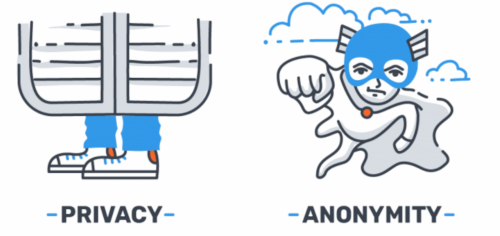
(Illustration from[^9])
Will this guide help you protect yourself from the NSA, the FSB, Mark Zuckerberg, or the Mossad if they are out to find you? Probably not ... Mossad will be doing "Mossad things" [^10] and will probably find you no matter how hard you try to hide[^11].
You must consider your threat model[^12] before going further.
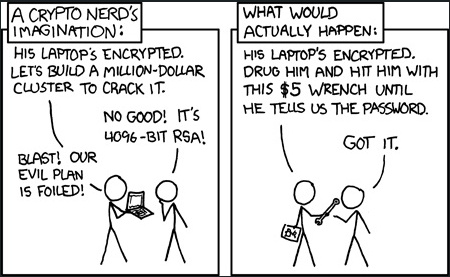
(Illustration by Randall Munroe, xkcd.com, licensed under CC BY-NC 2.5)
Will this guide help you protect your privacy from OSINT researchers like Bellingcat[^13], Doxing[^14] trolls on 4chan[^15], and others that have no access to the NSA toolbox? More likely. Tho we would not be so sure about 4chan.
Here is a basic simplified threat model for this guide:

(Note that the "magical amulets/submarine/fake your own death" jokes are quoted from the excellent article "This World of Ours" by James Mickens, 2014.[^10])
Disclaimer: Jokes aside (magical amulet...). Of course, there are also advanced ways to mitigate attacks against such advanced and skilled adversaries but those are just out of the scope of this guide. It is crucially important that you understand the limits of the threat model of this guide. And therefore, this guide will not double in size to help with those advanced mitigations as this is just too complex and will require an exceedingly high knowledge and skill level that is not expected from the targeted audience of this guide.
The EFF provides a few security scenarios of what you should consider depending on your activity. While some of those tips might not be within the scope of this guide (more about Privacy than Anonymity), they are still worth reading as examples. See